Explorations Guide
Explorations are TheoryCraft workspaces for one research idea, market question, or strategy investigation.
Last updated: June 26, 2026
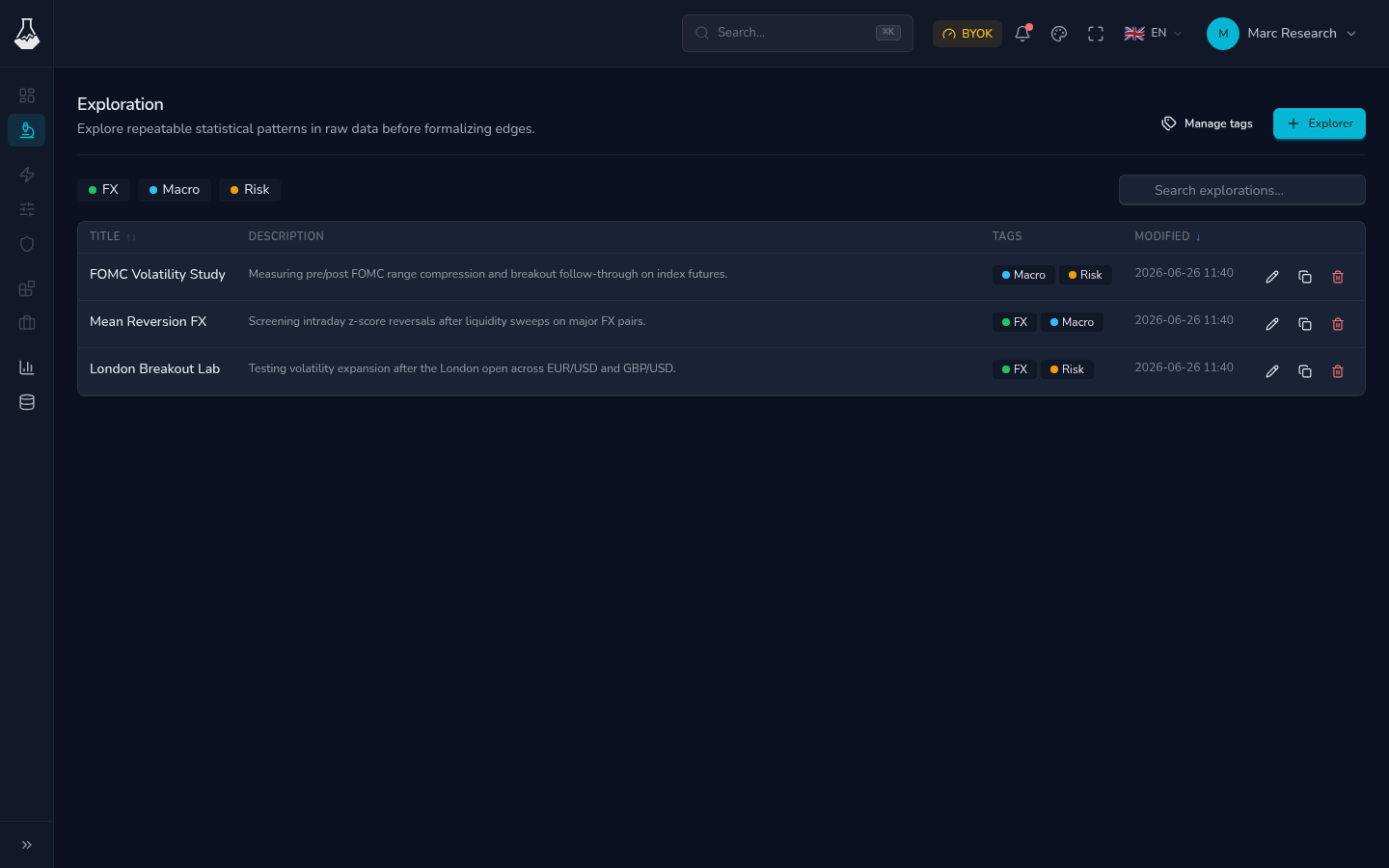
Use one exploration per coherent question: for example, "London Breakout Lab", "FOMC Volatility Study", or "Mean Reversion FX". Keeping the scope small makes notebooks, tags, shares, and prior decisions easier to review later.
What an Exploration Contains
| Item | What you use it for |
|---|---|
| Notebooks | Research code, notes, charts, validation output, and conclusions. |
| Files | Supporting inputs, exports, and saved artifacts attached to the workspace. |
| Tags | Search and grouping by market, method, status, or priority. |
| Notebook session | Interactive work when you need to run cells and inspect results. |
| Shares | Public read-only snapshots created from selected notebooks. |
An exploration is the main place where user-facing research work happens. It is separate from data source coverage, AI provider settings, billing, and external assistant setup.
Create a Useful Exploration
- Give it a precise title that will still make sense later.
- Add a description that states the hypothesis or question.
- Add tags for market, method, and status.
- Open the notebook workspace when you are ready to run analysis.
- Keep the main notebook readable: objective, assumptions, results, and decision.
- Share only reviewed notebooks with Share Explorations.
Avoid vague names like "test", "new idea", or "backtest 2". They become hard to search once you have several workspaces.
Organize the Library
The explorations page is built for scanning. Use search when you remember part of a title or description, use tags when you want a stable grouping, and duplicate when you want to branch from a known setup without overwriting prior work.
| Action | Use it when |
|---|---|
| Duplicate | You want a clean copy of a promising baseline. |
| Edit details | The title, description, or tags no longer match the work. |
| Delete | The work is obsolete and you do not need its files anymore. |
| Manage tags | Tags became too broad, inconsistent, or noisy. |
Before deleting, check that you do not need any notebook output, exported file, or public share from that exploration.
Working With Notebooks
New explorations include a starter notebook and a requirements.txt file. The notebook gives you a structured starting point, while requirements.txt lists packages that should be available when you start a notebook session.
For package details, see Notebook Environments. The short version is:
| Need | Recommended action |
|---|---|
| Keep a package for future sessions | Add it to requirements.txt. |
| Try a package once | Run %pip install package-name in a notebook cell. |
| Make imports reliable after changes | Restart the Python kernel or restart the notebook session. |
Good Exploration Habits
- Keep one primary hypothesis per exploration.
- Put temporary experiments in separate notebooks or duplicate the exploration.
- Save notebooks before sharing, stopping a session, or closing the tab.
- Use tags like
FX,Macro,Risk,Reviewed, orArchiveconsistently. - Write down why a result passed or failed, not only the final chart.
FAQ
Should I put multiple strategies in one exploration?
Only if they answer the same research question. Otherwise, create separate explorations or duplicate an existing one.
Do tags change notebook results?
No. Tags organize the library. They do not change code, files, packages, or outputs.
What should I read next?
Use Notebook Environments to run the workspace, Share Explorations to publish reviewed results, and AI Assistant when you want help reviewing or changing work.